


bigclash app payment methods guide for Australian players – fast deposits & secure withdrawals
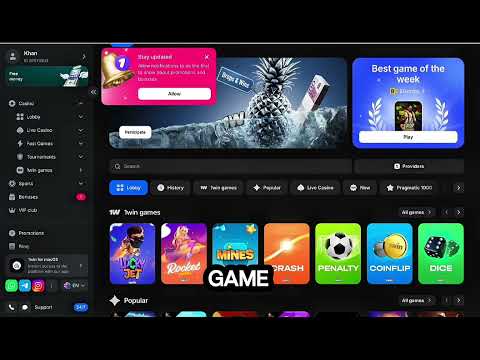
Practical Guide to the bigclash app for Australian Players
Getting Started: Registration and First Steps
The first thing you’ll notice when you open the bigclash app is how straightforward the sign‑up flow is. You’ll be asked for basic details – name, email, date of birth – then you’ll create a strong password. After confirming your email, the app will prompt you to verify your identity. This KYC step usually means uploading a photo of your driver’s licence or passport and a recent utility bill.
Australian regulations require these checks, so don’t skip them hoping to play faster. The verification usually clears within a few hours, sometimes a day, and once it’s done you can start exploring the casino and sportsbook sections. If you run into any hiccup, the live chat in the app is quick to respond.
Navigating the bigclash app: Interface and Game Selection
The bigclash app sports a clean, dark‑themed layout that feels familiar if you’ve used other Australian gambling apps. On the bottom navigation bar you’ll find four main icons: Casino, Live Casino, Sportsbook, and Promotions. Tapping Casino opens a grid of slots, table games and video poker, while Live Casino streams real dealers for blackjack and roulette.
Sports betting lives in its own tab, with a quick‑access menu for AFL, NRL, cricket and major overseas leagues. The app’s search function lets you type in a game or team name and jump straight to the market you want. For beginners, the “Featured” carousel highlights low‑stakes games and beginner‑friendly bets.
Bonuses and Promotions: What to Expect
BigClash markets a generous welcome bonus that is split across your first three deposits. The typical structure is 100% match up to AU$500 on deposit 1, 50% up to AU$300 on deposit 2, and 25% up to AU$200 on deposit 3. Each bonus comes with wagering requirements – usually 30× the bonus amount – which is fairly standard in the Australian market.
Beyond the welcome package, the app runs weekly reload bonuses, free spin giveaways and a loyalty points system that converts into cash. Keep an eye on the Promotions tab; most offers have a clear expiry date and a “Claim Now” button that adds the bonus directly to your balance.
Deposits and Payment Methods for Australian Players
Funding your bigclash app account is simple thanks to a range of local‑friendly payment options. Below is a quick comparison of the most popular methods, highlighting fees, processing time and any notable limits.
| Deposit Method | Fee (AU$) | Processing Time | Typical Minimum |
|---|---|---|---|
| Visa / MasterCard | 0 (except for some overseas cards) | Instant | AU$10 |
| POLi Payments | 0 | Instant | AU$20 |
| PayPal | AU$2 | Instant | AU$15 |
| Bank Transfer (BPAY) | 0 | Up to 24 hrs | AU$50 |
All methods are secured with SSL encryption, and most are processed instantly, meaning you can start playing within seconds of hitting “Deposit”. Remember to check the app’s “Deposit Limits” page if you want to set daily or weekly caps for responsible gambling.
Withdrawals: Speed, Limits, and Security
When you’re ready to cash out, the bigclash app offers the same methods for withdrawals as for deposits, except that PayPal is often limited to a maximum of AU$2,000 per request. The standard processing time for most e‑wallets and card withdrawals is 24 hours, while bank transfers can take up to 3 business days.
To protect your funds, the app may ask for additional verification before a large withdrawal – a photo of your ID and a selfie are typical. Once approved, the money is transferred to your chosen method with a tracking reference so you can follow the progress.
Customer Support and Responsible Gambling Features
The support team behind the bigclash app is reachable 24/7 via live chat and email. The chat widget pops up in the bottom‑right corner of every screen, and response times are usually under two minutes. For more complex issues, you can submit a ticket and expect a reply within the same business day.
Responsible gambling tools are built directly into the app. You can set deposit limits, loss limits, and session timers from the “Responsible Play” menu. If you ever feel the need to take a break, a self‑exclusion option will block your account for a period you choose – from one week up to six months.
Licensing, Security, and Fair Play Assurance
The bigclash app operates under a licence from the Malta Gaming Authority, a regulator recognised for its strict standards. This licence ensures that all games are regularly audited for fairness by independent testing labs such as eCOGRA.
Security-wise, the platform uses 128‑bit SSL encryption and stores personal data on secure, ISO‑27001‑certified servers. Regular security audits mean your personal and financial information stays locked away from prying eyes.
Tips for Beginners: Maximising Your Play on the bigclash app
If you’re new to online gambling, a few practical habits can stretch your bankroll and make the experience more enjoyable.
- Start with low‑stake slots or table games; they let you learn the rules without draining your balance.
- Always read the wagering requirements before you claim a bonus – a 30× condition on a AU$100 bonus means you need to wager AU$3,000 first.
- Use the “Quick Deposit” button for instant top‑ups, especially if you’re chasing a live‑dealer round.
- Set a session timer in the responsible gambling menu; a 60‑minute limit keeps play fun and prevents fatigue.
- Check the “Cashback” promotion on weekdays – it can return a small percentage of your net losses.
Finally, keep the official site bookmarked for the latest news and bonus codes. You can find it here: BigClash.